Models & LLM strategy
Any LLM. Your Choice, per Task.
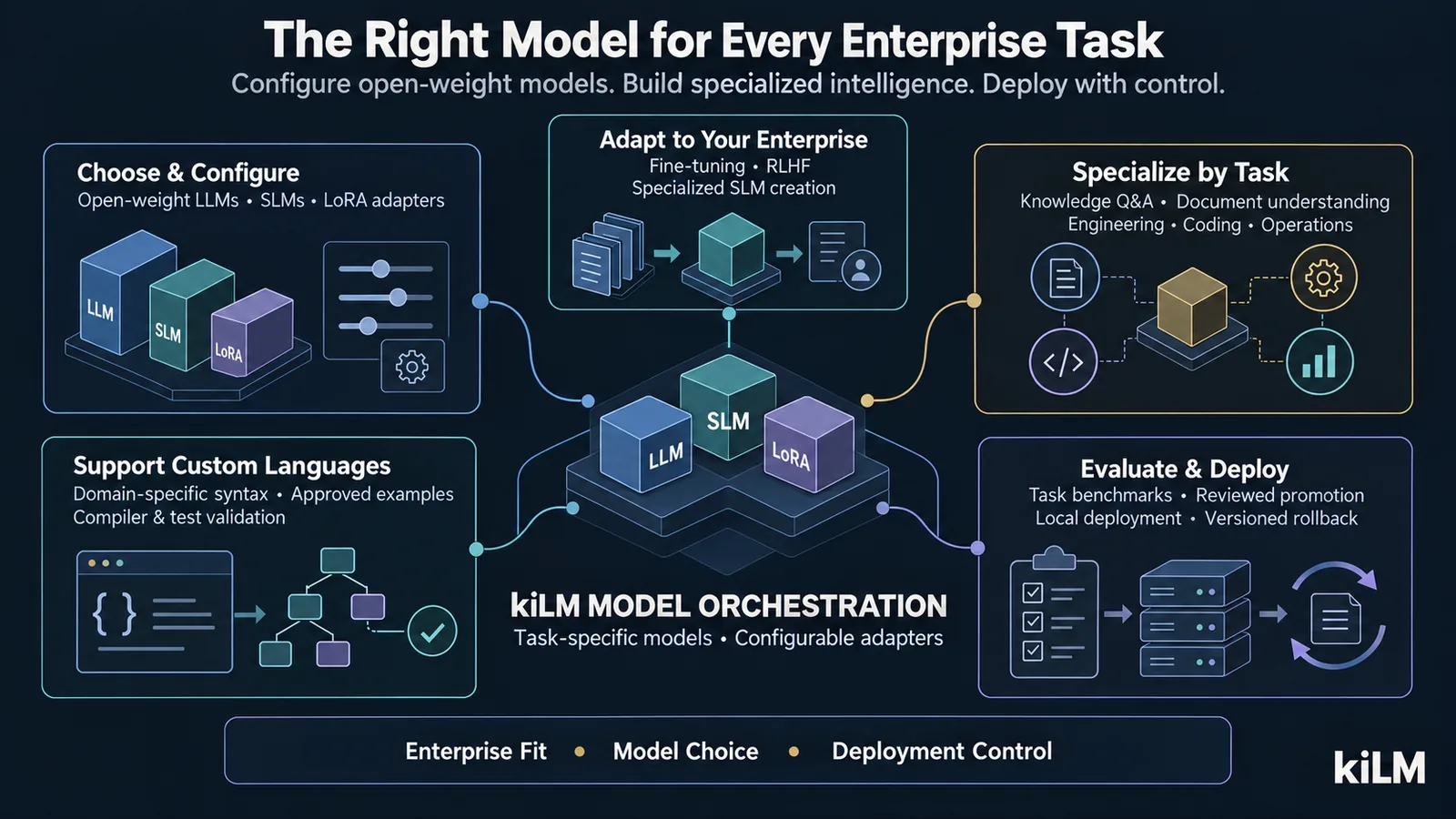
kiLM is model-agnostic by design. Run open-source, open-weights, frontier, or paid commercial Models — whichever you are licensed for and trust — and map different Models to different tasks inside the same deployment. You own the Infrastructure that matches your Model choice; kiLM runs a basic alignment check so obvious mismatches surface before they bite.
Bring Your Own Models
kiLM does not lock you to a single Model or vendor. Point it at the Model you want — running locally inside your deployment, or behind a hosted API you already pay for. The choice, the licensing, and the data-handling posture stay yours.
| Model | Category | What it is | Where it runs | Why teams pick it |
|---|---|---|---|---|
| Open source | Free Download | Models with openly published weights and permissive Training/usage Terms. | Locally, on your GPU/CPU — fully inside your boundary. | Maximum control, no per-token cost, works air-gapped. |
| Open weights | Free Download | Downloadable weights under a model-specific license (review the Terms for your use). | Locally, on your hardware. | Strong capability you can self-host and Fine-Tune. |
| Frontier | Your Purchase | The latest top-capability Models, offered as a hosted API. | Vendor-hosted — reached over an outbound network path you control. | Best-in-class reasoning when the task warrants it. |
| Commercial | Your Purchase | Any subscription or metered API Model your organization already procures. | Vendor-hosted API. | Use existing contracts, SLAs and vendor relationships. |
Local (open-source / open-weights) Models keep every byte inside your deployment and are the only option for fully air-gapped sites. Hosted (frontier / paid) Models require an outbound network path and are available only when your deployment posture permits outbound traffic.
Open-weight families are supported across tiers — including NVIDIA Nemotron (Nano for CPU / small-GPU sites, Super for a single GPU, and Ultra for multi-GPU installs), each with a built-in hardware-fit and license-review check. Nemotron ships under the NVIDIA Open Model License (or inherited Llama Terms), so kiLM flags it for license review rather than treating it as fully permissive, and enables it only when you opt in.
Open-weight coding models are supported the same way — including Muse Glimmer 30B (experimental, operator-supplied — pending license verification), offered in three serving profiles: a 4-bit K-quant with KV cache that runs on a single 24 GB card (32K context), a 4-bit build for the full 131K context on 32 GB+, and full-precision BF16 for a datacentre GPU (~80 GB). kiLM runs its hardware-fit check per profile and flags the model for license review; it stays out of automatic routing until an operator confirms the weights' license and specs and opts in.
Bring your own NVIDIA NIM. kiLM can connect to NVIDIA NIM inference microservices you run yourself — an opt-in, license-gated connector for Nemotron and other NIM-served Models over the standard OpenAI-compatible API. kiLM ships the connector, not the NIM containers: you supply your own NVIDIA entitlement, container, and hardware, on-prem or in your own cloud. Off by default; nothing NVIDIA is bundled or pulled unless you enable it.
Embedders (Retrieval Vectors)
Retrieval quality starts with the embedder — the Model that turns your text and images into vectors. kiLM ships permissive defaults, runs them locally (no external API, air-gap friendly), and lets you choose per deployment. The embedder is deliberately locked once you generate embeddings: the vector index is dimension-locked, so switching Model happens only through a controlled, no-downtime re-index — never a silent change.
| Embedder | License | Dim | Runs on | Role in kiLM |
|---|---|---|---|---|
| multilingual-e5-large (default) | MIT | 1024 | CPU or GPU | Multilingual text Retrieval (JA/ZH/KO/AR + English) |
| SigLIP 2 Large | Apache-2.0 | 1024 | GPU recommended | Image + figure/diagram Retrieval (same vector space) |
| FlashRank / BGE reranker | MIT / Apache-2.0 | — | CPU (FlashRank) / GPU (BGE) | Re-ranks retrieved results for precision |
| all-MiniLM-L6-v2 · BGE · Nomic · E5 | MIT / Apache-2.0 | 384–1024 | CPU | Smaller / English-only alternatives (choose before ingesting) |
| Llama-Embed-Nemotron 1B / 8B (planned) | NVIDIA Open Model / Llama (review) | high | GPU only | Premium high-accuracy multilingual / enterprise Retrieval |
Planned open-weight embedders (e.g. NVIDIA Llama-Embed-Nemotron) are treated as premium, opt-in, GPU-only options under license review — never the universal default. Most installs are best served by the permissive defaults above.
Usable LLMs by Tier
A quick orientation: representative Models kiLM customers run at each cost and hardware tier as of 2026. Use it to anchor sizing — not as a fixed menu. kiLM auto-applies the best free Model for a task and only uses a paid Model after an explicit admin opt-in.
| Tier | Example Models (2026) | Runs on | Typical use in kiLM |
|---|---|---|---|
| Free (open-weight, no license cost) | Llama 3.2 1–3B, Qwen3 1.7–4B, Gemma 3 4B, Phi-4-mini, plus open embeddings (bge, nomic, all-MiniLM) | Your own CPU or a small GPU — zero per-token cost | Run kiLM end-to-end at no Model spend; extraction, classification, embeddings |
| Frontier (hosted API) | Claude Opus 4.8, GPT-5.5, Gemini 3.1 Pro, Grok 4.3 | Vendor-hosted; an outbound path you control | Deepest reasoning and synthesis for the few steps that need it |
| CPU only (no GPU) | Gemma 3 4B, Qwen3 1.7–4B, Llama 3.2 1–3B, Phi-4-mini (quantised) | Commodity servers or laptops — fully air-gappable | Lightweight chat, routing and extraction where no GPU is available |
| GPU (small) — one card, ~8–24 GB | Qwen3 8–14B, Gemma 4 12B, Mistral Small 4, Llama 4 8B-class, DeepSeek-R1-distill 14B, Muse Glimmer 30B (4-bit, experimental) | A single consumer or pro GPU | Solid local chat / RAG and a per-task workhorse |
| GPU (large) — multi-GPU or 48 GB+ | Llama 4 Scout / Maverick, Qwen3.5 (122B), Mistral Large 3, DeepSeek V4, GLM-5.1, Kimi K2.6, Muse Glimmer 30B BF16 | Multi-GPU or a large-VRAM server | Top open-weight quality and long context, fully in-boundary |
Examples, not limits. Model names and rankings move fast — treat this as a June 2026 snapshot. Choosing any other Model — a newer release, a different family, or a commercial API you already License — is entirely possible and is up to each customer.
Pick the Right Model for Each Task
One Model rarely fits every job. kiLM lets you assign a Model per task or pipeline stage — so a small, fast, local Model can chew through high-volume extraction while a frontier Model handles the few steps that genuinely need deeper reasoning. You tune the balance of cost, latency, privacy and quality task by task.
| Task / pipeline stage | A sensible Model choice | The trade-off you are tuning |
|---|---|---|
| High-volume Ingestion & extraction | Small/fast local Model | Throughput & cost over peak reasoning |
| Embeddings & Retrieval | A dedicated embedding Model | Recall quality & vector dimensionality |
| Chat / RAG over your Knowledge | A capable mid/large local or hosted Model | Answer quality vs latency & privacy |
| Nuanced reasoning & synthesis | A frontier Model (where posture allows) | Top capability vs per-token cost & egress |
| Classification & routing | A small specialised/local Model | Speed & determinism at scale |
Infrastructure Alignment: Yours to Own, Ours to Check
Choosing a Model implies an Infrastructure to match it — GPU memory, quantization, context window, throughput and concurrency for local Models; API keys, an outbound path and any data-residency obligations for hosted ones. Aligning your Infrastructure to the Model you select is the customer's responsibility — you size and provision it (our Infrastructure guidance helps), and we will size it with you.
| You own | kiLM checks (basic alignment) |
|---|---|
| Provisioning GPU memory / CPU for the chosen local Model. | Flags when a Model's weights or context clearly won't fit the configured resources. |
| API keys, credentials and the outbound network path for hosted Models. | Flags a missing key or a blocked egress path for a Model configured as hosted. |
| Choosing the embedding Model and its dimensionality. | Flags an embedding-dimension mismatch against your vector store. |
| Capacity, throughput and performance tuning for your workload. | Surfaces obvious misconfiguration at start-up; it does not auto-provision or guarantee performance. |
The check is a guardrail, not a substitute for sizing: it catches the obvious mismatches early so a deployment fails fast and clearly rather than at runtime. Final capacity and performance remain a customer-side responsibility.
Beyond Text: Multilingual, Audio & Video
Your data isn't only English text. kiLM lets you select Models that handle multilingual corpora and multimodal inputs — audio (for example speech and transcription) and video — wherever the Model you choose and the Infrastructure you provide support it. Pick a multilingual or multimodal Model for the relevant pipeline, then align the Infrastructure it needs (typically more GPU memory, and specialised runtimes for audio or video).
The same principle applies: kiLM gives you the freedom to choose multilingual or multimodal Models and run a basic alignment check; matching the Infrastructure to those heavier workloads stays with you.
Choosing an Open-Source / Open-Weight Model for kiLM's Responsibilities
Across the whole lifecycle — Ingestion, KG & relation extraction, Ontology alignment, federated SQL planning, agentic tool-calling chat, compliance reasoning and multilingual response — kiLM leans on a specific set of Model capabilities, not raw size. Start from what each step needs, then pick a Model that clears the bar. You can still assign any Model per task; for high-risk steps, selection should fail closed.
What kiLM Asks of a Model
| Capability | Why kiLM needs it (and the practical bar) |
|---|---|
| Context length | Long documents, multi-chunk synthesis and summarization. Practical bar: ~8k+ tokens for chat/extraction, ~32k for summarization. |
| Tool-calling | Agentic chat, the MCP gateway and federated SQL planning are driven by tool calls. A Model without tool-calling cannot run these steps at all. |
| Structured output | KG/relation extraction, Ontology alignment and schema/SQL generation need reliable JSON and schema adherence — not prose that merely looks structured. |
| Reasoning depth | Compliance reasoning, relationship inference and Ontology convergence need mid-to-high reasoning, not just fluent Retrieval. |
| Multilingual | Multilingual corpora and responses for organizations that Operate beyond English. |
How Common Models Fit
| Fit for kiLM's core role | Example Models & guidance |
|---|---|
| Core workhorse | qwen2.5:14b — clears context, structured output and multilingual for the main extraction / chat / medium-reasoning path. |
| Heavy reasoning | mixtral:8x7b; qwen2.5:72b / llama-4-scout / approved frontier APIs — complex grounded RAG, compliance explanation, relation reasoning and the hardest paths (subject to license, hardware, outgoing-plan and cost approval). |
| Entry / fallback only | llama3.1 (8B), qwen2.5:7b, phi-4-mini — fine for basic RAG, routing and simple structured tasks; too small alone for deep KG reasoning, long-context synthesis, compliance or federated SQL planning. Pair with a stronger Model on the heavy steps. |
| Specialist (supporting, not core) | Vision: moondream, llava, qwen2.5vl:7b · Code: deepseek-coder:67b · Tiny: phi3:mini (3.8B/4k). Strong only in their niche; they lack the tool-calling / structured output the core role needs. Use for visual extraction, code, or classification/fallback — not as the main reasoning Model. |
| Unverified — gate before production | Placeholder / unverified builds (e.g. gemma-4-31b, kimi-k2.6, qwen-3.6, deepseek-v4). Don't trust on a production decision path until operator-verified for the capabilities above. |
Why it matters: a Model that misses a capability fails in practical ways — malformed JSON, missed tool calls, hallucinated schema mappings, unsafe SQL plans and bad Ontology updates. kiLM's guards help, but for high-risk steps Model selection should fail closed. Model names are a June 2026 snapshot — route per task and verify any new Model before trusting it on a decision path.